Back to Portfolio
// 05 INDEPENDENT PRODUCT — 0 → 1

POOPETRATORZERO TO PILOT

AN MVP I DESIGNED, BUILT & TOOK TO MARKET

ROLE Founder · Product Designer · Builder
TYPE B2B SaaS MVP
TIMELINE Aug – Nov 2026
TAGS
0 → 1 PRODUCT STRATEGY DESIGN IN CODE
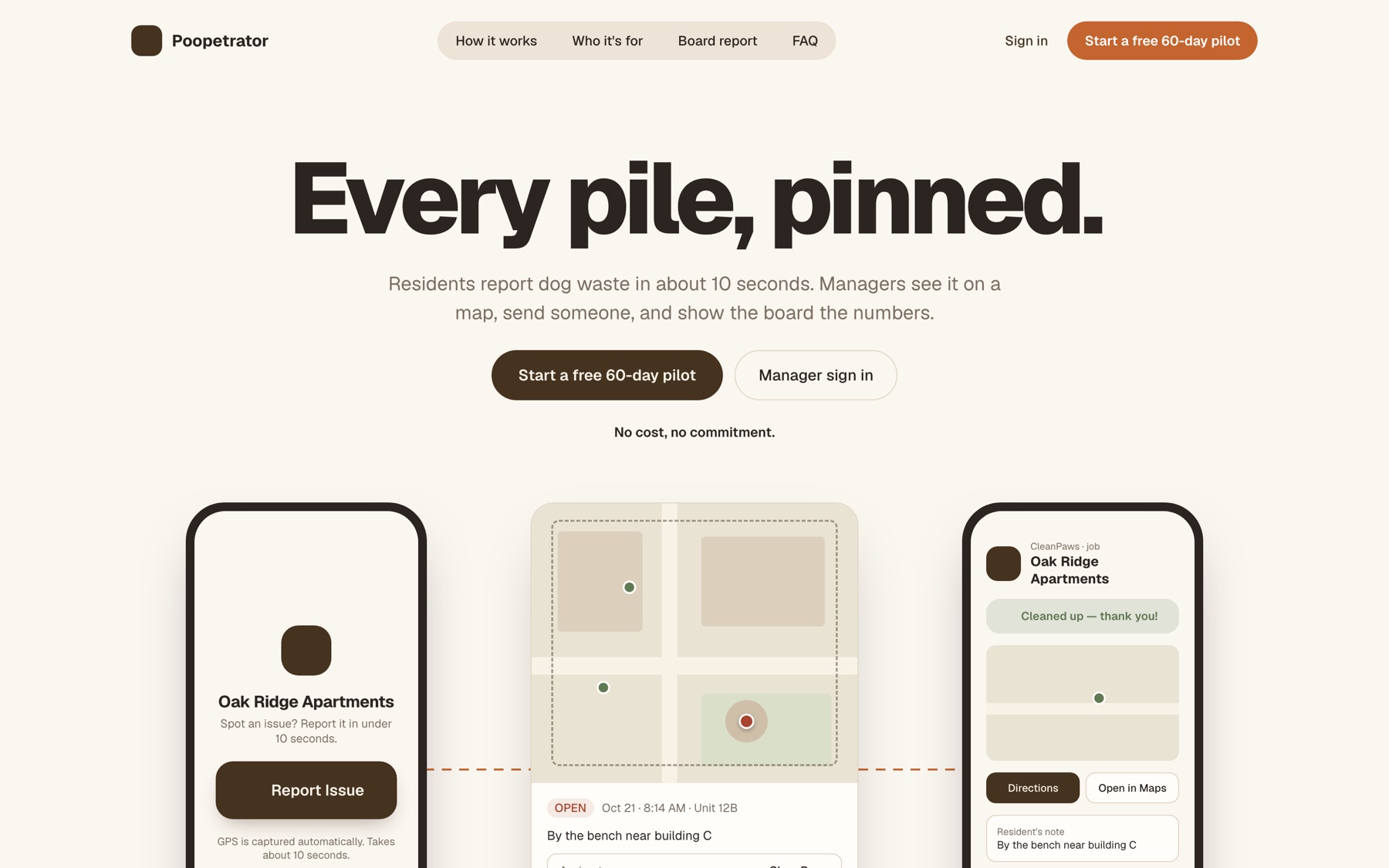
Poopetrator marketing site: 'Every pile, pinned.' with resident, manager and vendor screens
// overview

My other case studies show how I work inside large teams. This one shows what happens with no team at all. Poopetrator is a dog-waste reporting product for apartment complexes and HOAs, and I took it from an empty repository to a pilot-ready product on my own: research, product decisions, UX and visual design, the working application, and the marketing site that sells it.

Yes, the name is a joke. The product isn't. The interesting part of this project is less any single screen than the decisions about what not to build so that a real property could start using it.

WHO
Property managers and HOA boards who field complaints about dog waste, the residents who report it, and the grounds vendors who clean it up.
CHALLENGE
Residents won't download an app or create an account to report a mess. Managers get vague complaints with no location, no photo, and no record they can show the board.
SOLUTION
A ten-second, no-account web flow for residents that drops a GPS pin and photo onto a manager's map, with one-tap assignment to staff or a vendor and a printable report for the board.
// 01

“By building C
somewhere.”

THE PROBLEM

Complaints arrive by email, in a resident Facebook group, or as a note at the office. They're late, they're vague, and they rarely reach whoever actually cleans up. There's no record to show the board, and residents who never hear back simply stop reporting.

That gave the MVP a clear job: turn a vague complaint into a pin, a photo, and a person on it, and close the loop so the resident knows it was handled.
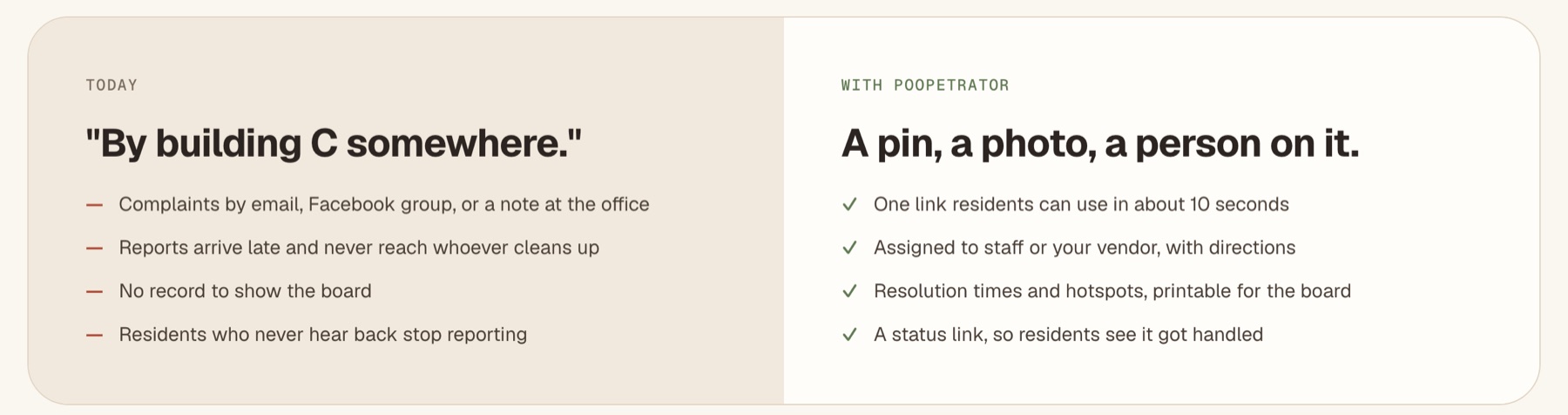
Before and after: scattered complaints versus a pin, a photo and a person on it
// 02

Designing for
Ten Seconds

THE RESIDENT EXPERIENCE

The resident is a passer-by holding a leash. Every field is a reason to give up, so the design question for each step was “can we remove this?” There's no app to download and no account to create. GPS is captured as soon as the page opens, and the photo and note are both optional.
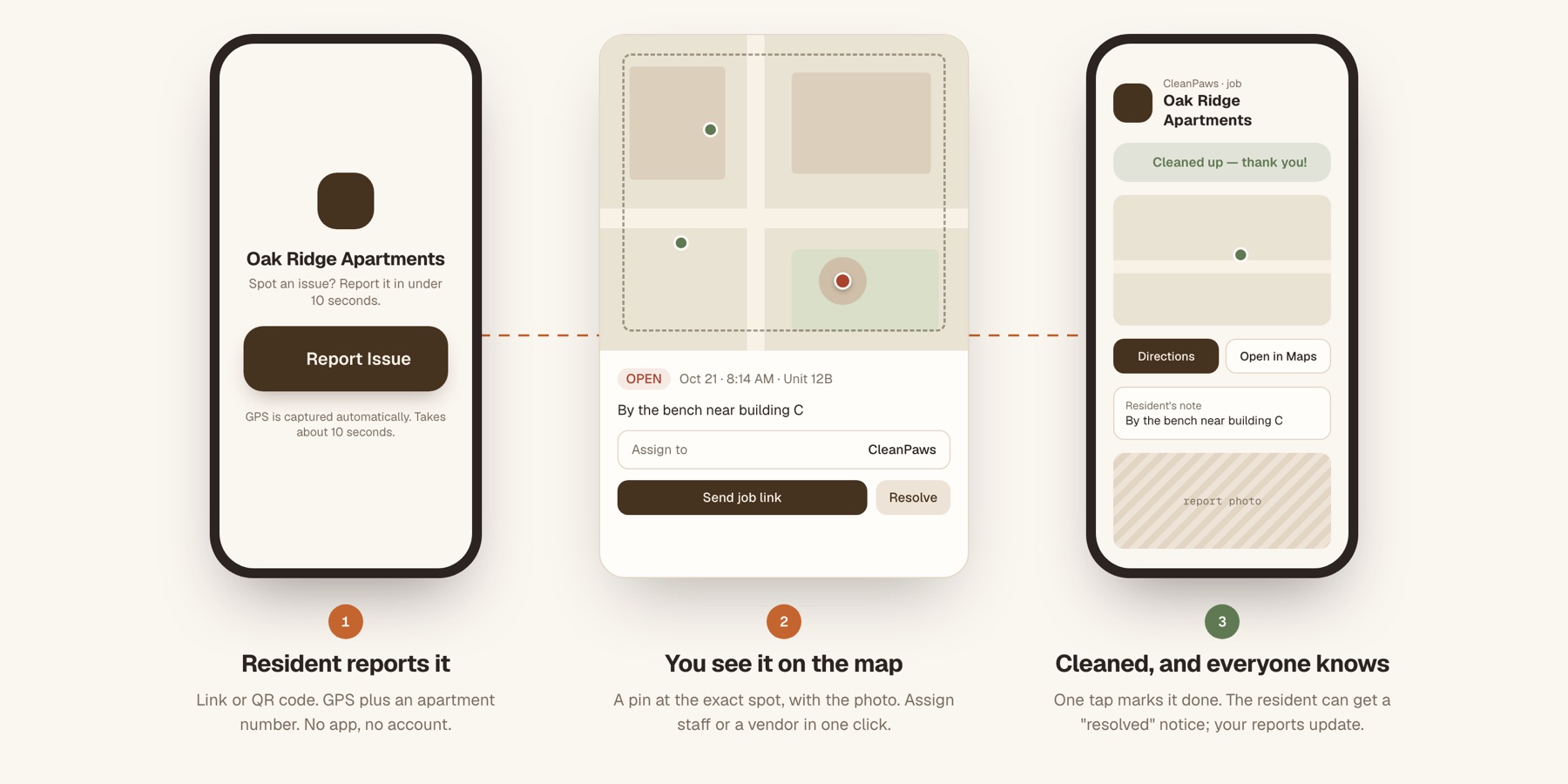
Three steps: resident reports it, manager sees it on the map, vendor marks it cleaned
01
Location is the login
Residents sign in by standing on the property: their GPS position is checked against a boundary the manager draws, plus an apartment number. A printable QR sign and a shared access code cover the cases where location isn't available.
02
Graceful failure when GPS is weak
GPS indoors or under trees can be off by 30m or more. When the fix is poor, residents can switch to a map and pan a pin to the exact spot. Reports from outside the boundary are caught before they're sent, not after.
03
“Someone already reported this spot”
As the location settles, the form shows any open report nearby, with its photo. It's informational rather than blocking. On the manager's side, duplicates merge into one job so their inbox isn't flooded.
04
Privacy by default
An apartment number rather than a name. Photo metadata (location, device) is stripped on upload. Vendors and other residents never see who reported something. Trust is a feature when you're asking neighbours to report neighbours.
// 03

Triage, not
an Inbox

MANAGERS, BOARDS & VENDORS

The manager dashboard is designed for speed of triage: a live map and a compact list, a persistent status filter, and a detail panel that is a sidebar on desktop and a bottom sheet on a phone. Status changes appear instantly, before the server confirms them.

Grounds vendors get a link, not a login: the exact location, the photo, directions, and one tap to mark the job done. Managers choose instant alerts, a daily digest, or alerts only past a threshold, and every change is recorded in an audit trail.
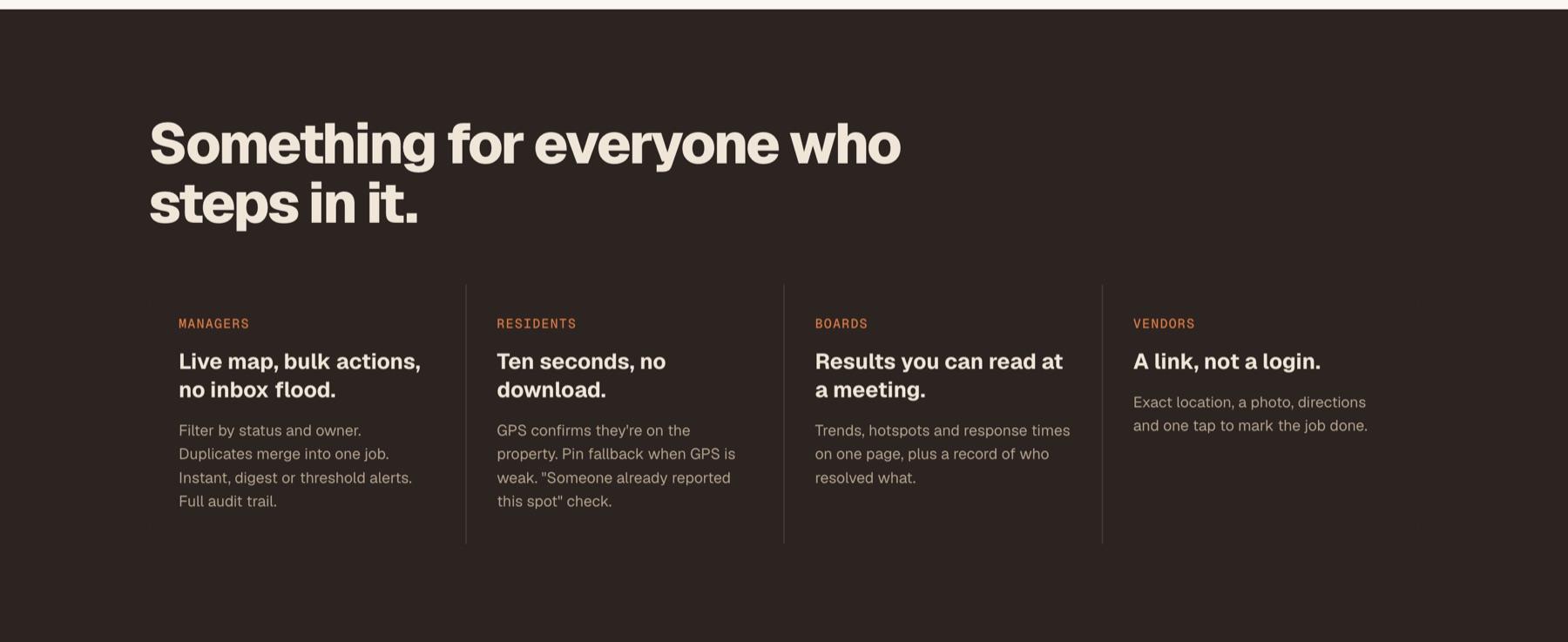
What managers, residents, boards and vendors each get
// 04

Scope Is a
Design Decision

WHAT I BUILT, AND WHAT I DELIBERATELY DIDN'T

An MVP isn't a smaller version of the finished product. It's the least you can build to learn whether anyone wants it. I held every feature to the same test: does a pilot property need this in order to say yes? If not, it waited, however good an idea it was.

MADE THE CUT
  • The ten-second report
    The whole product depends on residents actually reporting.
  • Map triage & vendor job links
    A report nobody acts on is worse than no report.
  • Resident status updates
    Closing the loop is what keeps people reporting.
  • The board report (PDF & CSV)
    This is what a manager shows the people who approve the budget.
  • Abuse limits & privacy
    Non-negotiable once a real property's residents are using it.
DELIBERATELY LEFT OUT
  • Product analytics & tracking
    Before there are users, instrumentation only measures me. Pilots come first, and talking to them is the signal.
  • Resident accounts
    Location plus an apartment number is enough identity. A sign-up form would kill the ten-second promise.
  • Native apps
    A QR code on a sign beats an app-store install for a task this small.
  • Self-serve signup & billing
    Early customers are onboarded by hand, and every one of those conversations is research.
  • Infrastructure built for scale
    One server and a simple database. Cheap to run, easy to change, and documented as a known limit to revisit.

Leaving analytics out wasn't an oversight. It was the first item on the list for after the pilot, once there's real behaviour worth measuring.

// 05

Designing for
the Buyer

THE BOARD REPORT

Residents use the product, but the property manager pays for it and has to justify it to an HOA board. So the board report got real design attention: pick a date range and print. It shows totals, the share resolved within 24 hours, median time to resolve, reports per week, the top problem areas, and who handled what. It's the reason to buy, designed as carefully as the reason to use.
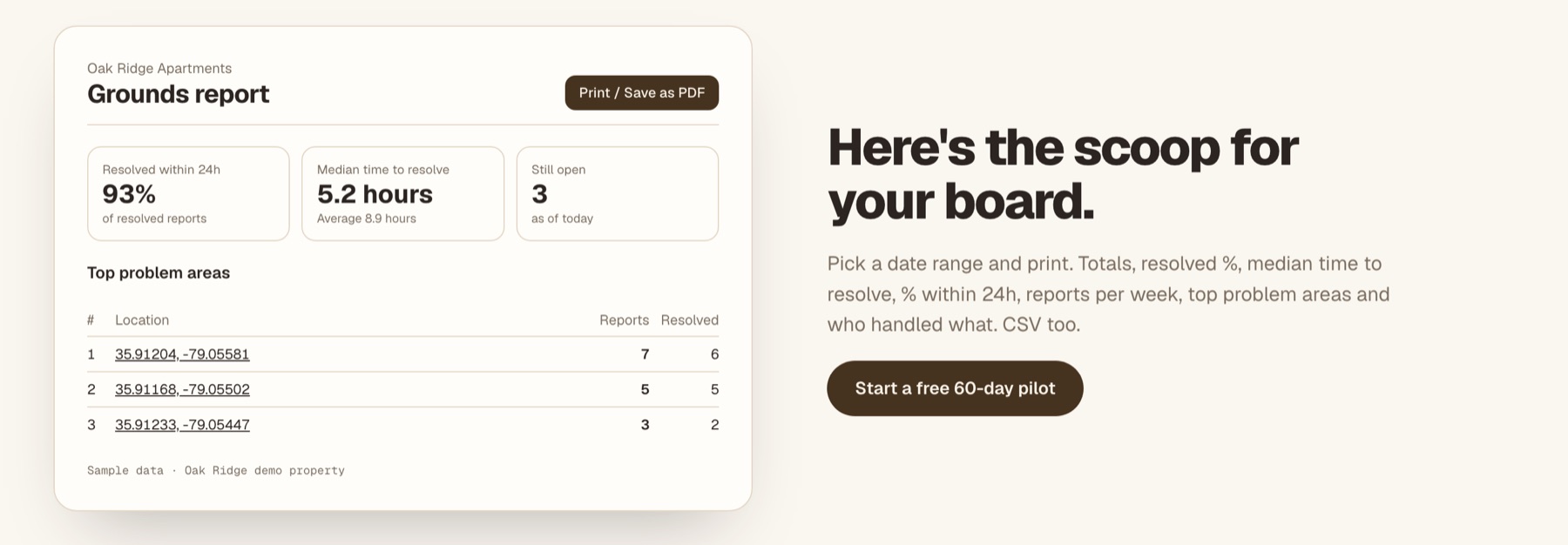
Printable grounds report with resolution rate, median time to resolve and top problem areas

// sample data — demo property

// 06

One Product,
Two Brands

THINKING PAST THE FIRST USE CASE

Once the core loop worked, it was clear that “resident pins a problem, manager sends someone” isn't only about dog waste. Broken lights, overflowing bins and damaged fences follow the same pattern. Rather than fork the product, I made the brand a skin: Poopetrator and FixItPin run from the same app and database, and the web address decides which one you see.

Each property chooses which kinds of issue residents can report. With a single category, the interface never mentions categories at all. Even the language adapts: a resolved report reads “Cleaned up” or “Fixed” depending on what it was.

// 07

Designing in
the Real Medium

HOW IT WAS BUILT & LAUNCHED

I designed most of this in the browser rather than in Figma, because a GPS fix, a slow cell connection and a phone camera behave in ways a mock-up can't show. I also built the marketing site, with its free 60-day pilot offer and pilot sign-up page, and set up deployment for both.

Next.js React TypeScript Tailwind shadcn/ui Prisma Leaflet Resend
AI-ASSISTED DEVELOPMENT LET ONE PERSON:
  • Go from design decision to working feature in a single sitting
  • Test interactions on real phones instead of describing them in specs
  • Keep a living product guide that records every architectural decision
  • Spend the saved time where it mattered: deciding what to build
~10s
Target time for a resident to file a report
0
Accounts or apps a resident needs
1 → 2
Codebase serving two branded products
// what's next

What I'll Measure
Once It's Live

INSTRUMENTING THE PILOT

With pilot properties using it, analytics moves from “not yet” to the top of the list. These are the questions I'd instrument first:

01
Does the ten-second promise hold?
Time from opening the page to submitting, and where residents drop off, especially at the location permission prompt.
02
Does closing the loop keep people reporting?
Repeat reporting from residents who opted in to status updates, compared with those who didn't.
03
Is the property actually getting cleaner?
Time to resolve and repeat hotspots over the pilot's 60 days. That's the result the board is paying for.